

Beginning this past week, your license manager in your device management system might be showing you a value that just plain sounds crazy. Here was mine this morning:

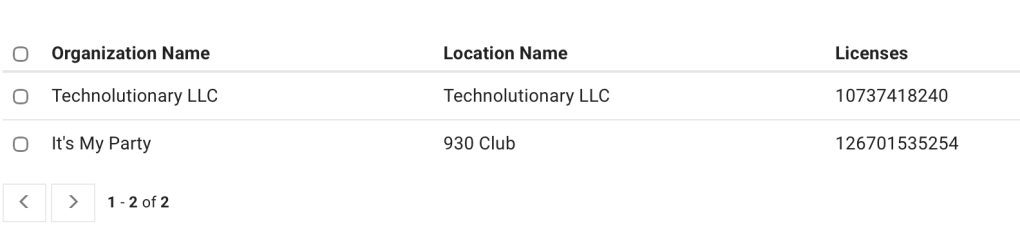
That top number looked insane, so I went to see what the breakdown was:

Ah, there’s my culprit. That’s… a lot of licenses?
What’s Changed?
One of the changes that was revealed this past summer about Apple Business was a change to Apple’s own Volume Purchase Plan licensing program allowing for “unlimited” licenses of specific free applications. When the change went public this week, developers who did not opt out of unlimited licensing have had their applications available for unlimited use by business and education customers.
Beginning on October 22, 2026, if you would like to distribute any free (read: no charge) application via the Apple Volume Purchase Program (VPP) mechanism in your device management service of choice, you can do so with an unlimited license.
It used to be you had to guess not just how big your current fleet was, but how big it might be at some point in the future when making an initial license assignment. You might want to leave room for various future expansions, for example, and so you might pickup another 1,000 or so licenses of a free app.
This is no longer the case. Welcome to the world of unlimited free licenses for most free apps in the App Store.
Why 2147483647?
That’s a very… specific number.
Yes. It’s one less than 2 to the 31st power, and it’s the maximum size of a signed 32-bit integer.
That was, apparently, the largest number of licenses that the Apple licensing system could handle, and represents a special value for these “unlimited” apps.
What Else is Changing?
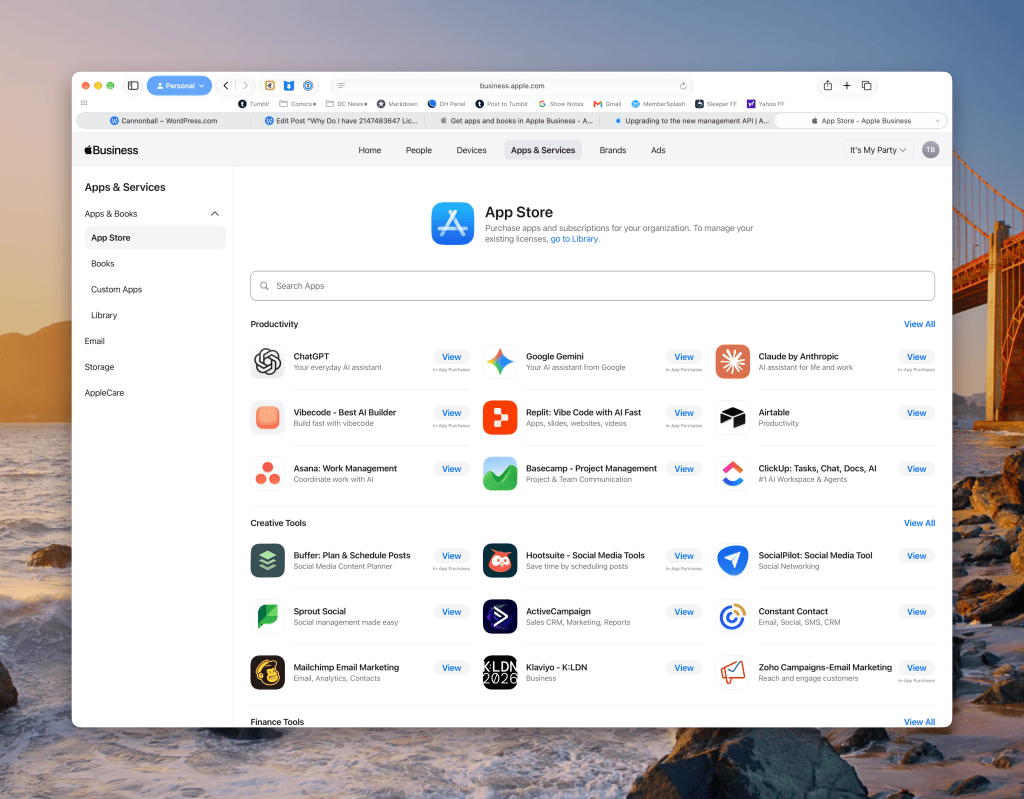
First of all, the Apps & Services section of Apple Business now has a native listing and search functionality for Apps. This new App Store is finally native and fast and and is no longer just an iFrame to the old App Store! Kudos, this is a great upgrade for Mac Admins:
In addition, there is a new Library view that contains all your currently purchased assets (Apps and Books):
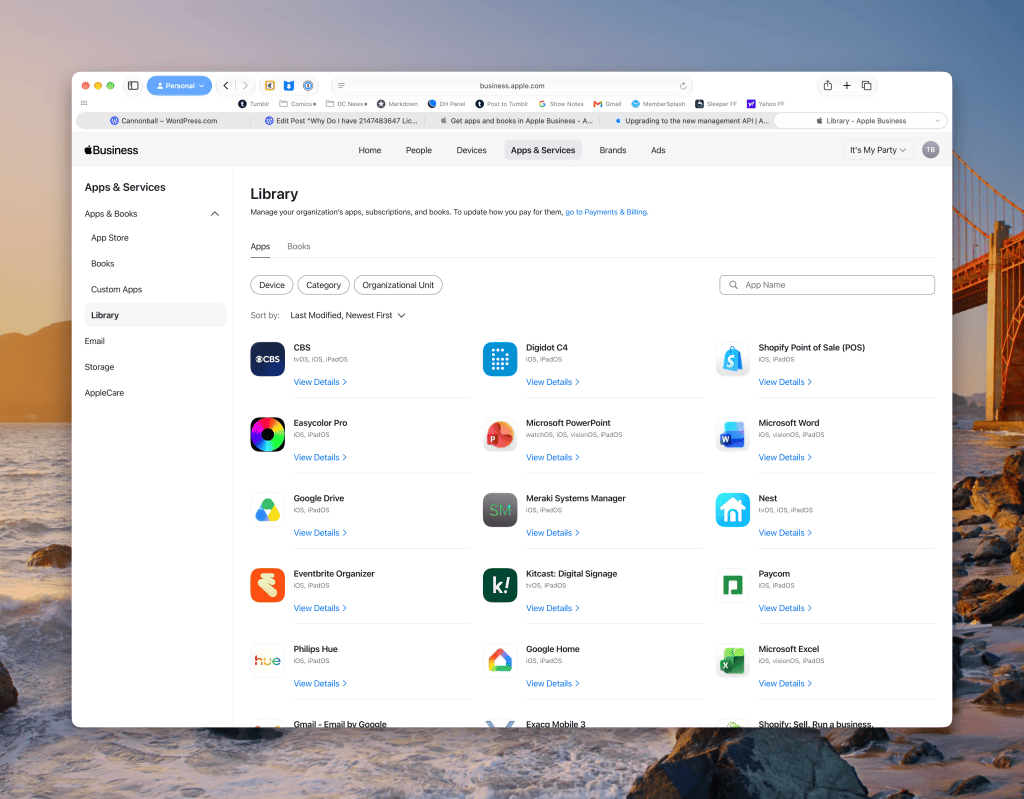
The Library is filterable across multiple dimensions, and you can use the search function to limit down to specific apps or books.
There are new objects in the VPP Asset database at Apple that you can now query related to unlimited assets. The UnlimitedResponseAsset is intended to describe an asset with unlimited licenses:
| adamId string | The unique identifier for the product in the store. |
| assignedCount int32 | The assigned amount of the asset. |
| deviceAssignable boolean | The flag denoting whether the asset is device-assignable. |
| pricingParam string | The quality of the product in the store. Possible Values: STDQ, PLUS |
| productType string | The asset product type. Possible Values: App, Book |
| revocable boolean | The flag denoting whether the asset is revocable. (Due to licensing, generally, books are not revocable. Apps may be revocable but don’t have to be.) |
| supportedPlatforms string | The platforms that the asset supports. Possible Values: iOS, macOS, tvOS, watchOS, visionOS |
What’s Not Changing?
Existing licenses of free applications are not automatically converted to Unlimited licenses. If you “bought” 50 seats of a free app, you still have a 50-seat free license associated with your VPP account. You can continue to “buy” more free seats in tranches at your convenience. Once an application has a number of licenses (paid or free), there’s a process to move toward unlimited.
How Do I Move To Unlimited Licenses?
At first, I thought the process might be complicated. I thought you might have to remove the current number of seats by unassigning the licenses from your location and device management service.
Thankfully, that is not the case!
My deepest thanks to my collaborator Selina Ali from Addigy for helping me here, as the steps aren’t documented in Apple’s documentation anywhere, and I was afraid I was going to have to take the long way around.
Here’s how you move to an Unlimited License:
Start from the App detail page in your Library:
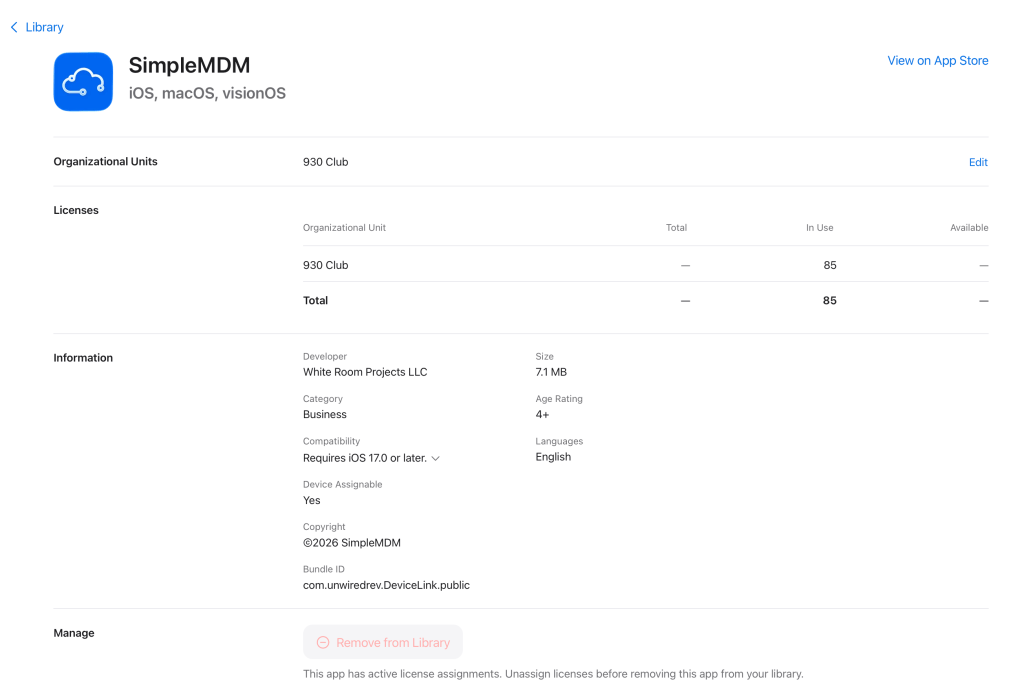
Up at the top where the Organizational Units are, click Edit.
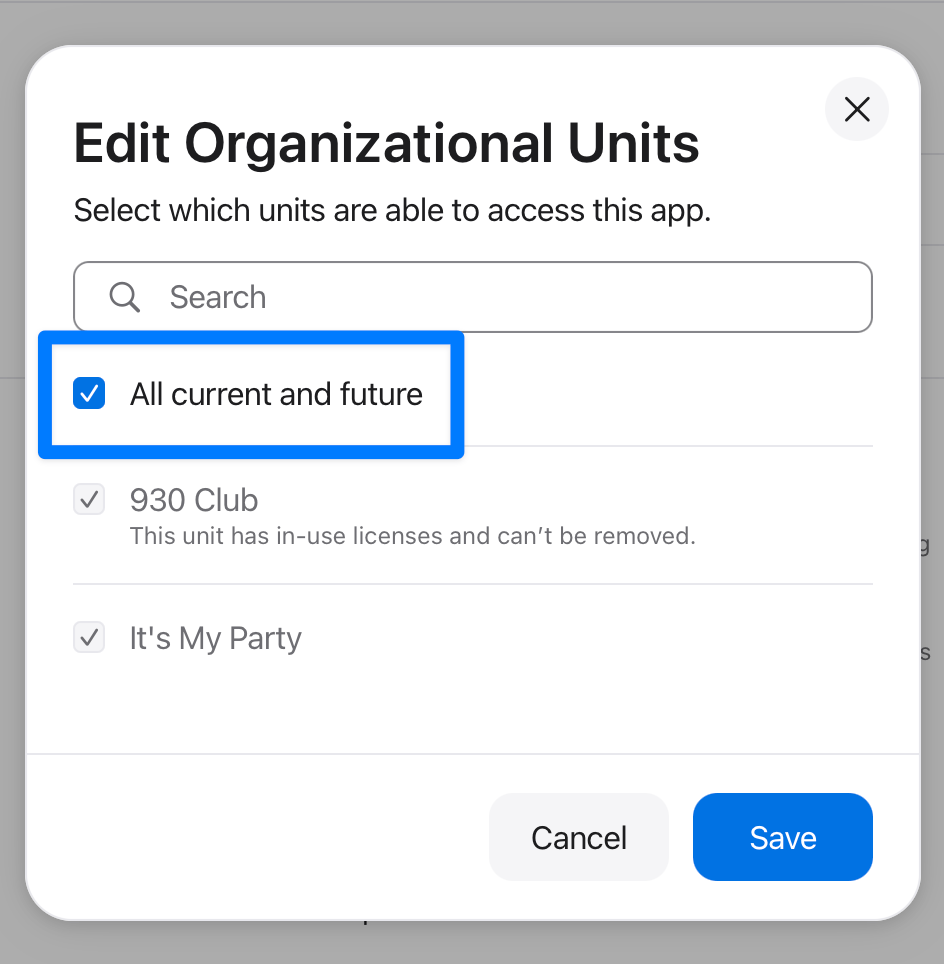
Check the “All current and future” box, and click Save.
Your licenses are now unlimited. You don’t have to do anything else! This is great.
However, you may want to contact your device management service if suddenly you’ve got a lot more licenses than sanity would normally permit and ask them when they’re updating the counts to exclude the new unlimited counts.
It is likely that Apple did not give a heads up to device management systems that this change was coming by a specific date, and so many may be playing catchup.
What Happens if an App Goes From Free To Paid?
If the developer of an app decides to move from free distribution to paid distribution, and you have opted into an unlimited license, the license will convert from unlimited to cover your current number of licenses in use. Future additions to your licenses will need to be purchased out of the store, but you will not have to backfill the purchase to cover your previous usage.
This strikes me as a fair compromise.
Wait, Aren’t Subscriptions Coming, Too?
Yes, they are, but that is a different blog post for a different day.
One note about Subscriptions I will share, shared with me by Selina, Apple has placed a failsafe in the current VPP connectors: you will not be able to assign subscriptions to a VPP Token (or device management service) that does not explicitly support subscriptions.
If subscriptions are important to you, it’s time to file feedback with your device management service of choice. Come with examples and dollar amounts. Don’t invent reasons.

